GSTR filing
File GSTR-1 and GSTR-3B from your phone
The sales and purchases you record in GimBooks fill your GST return. Log in to the GST portal from the app with an OTP, check the tables, create the challan, pay and file with an EVC, without retyping a single invoice.


- GSTR-1 and GSTR-3B
- Pay by UPI, NEFT or IMPS
- GSTR-2A and 2B matching
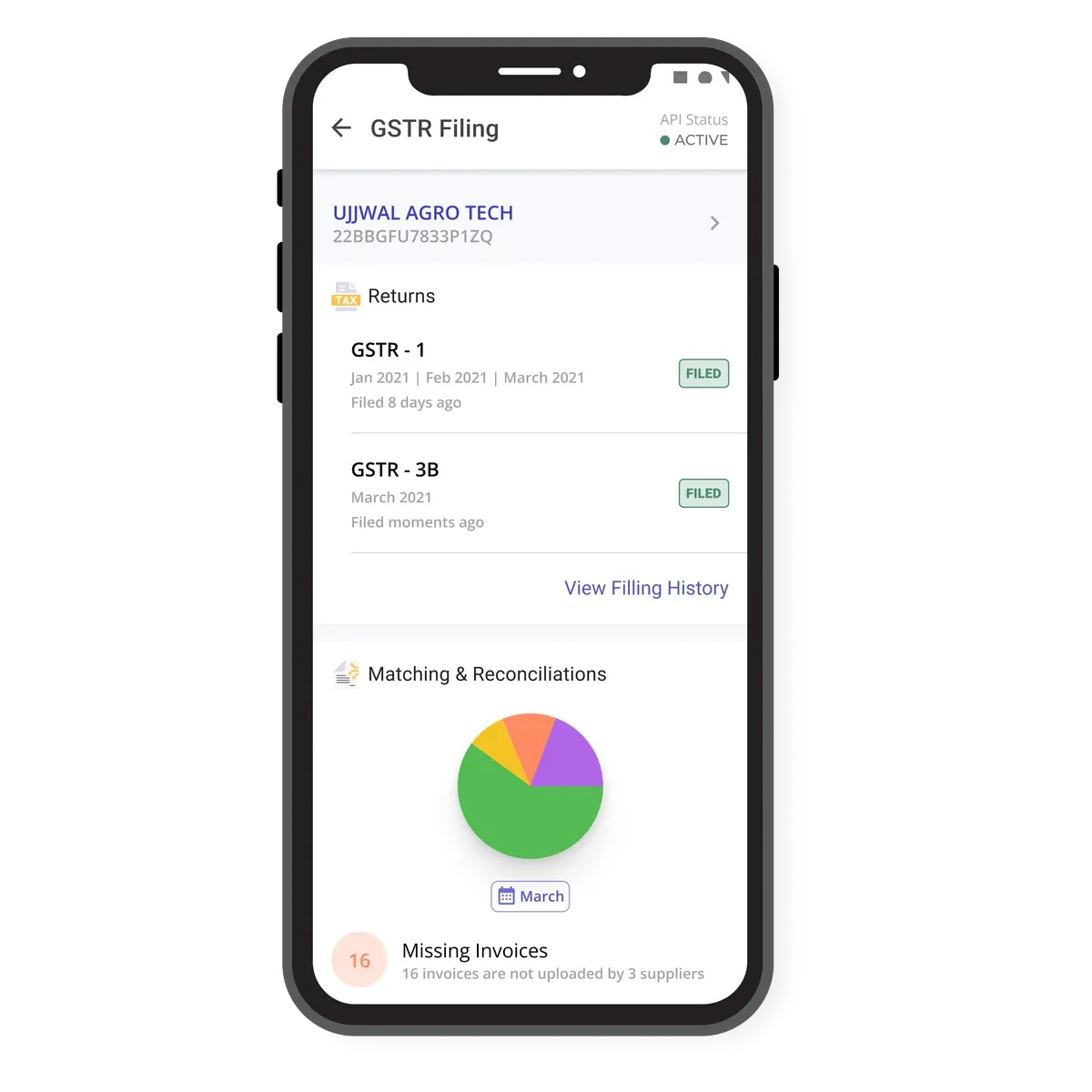
Check before you file
The 3B tables, filled from your books
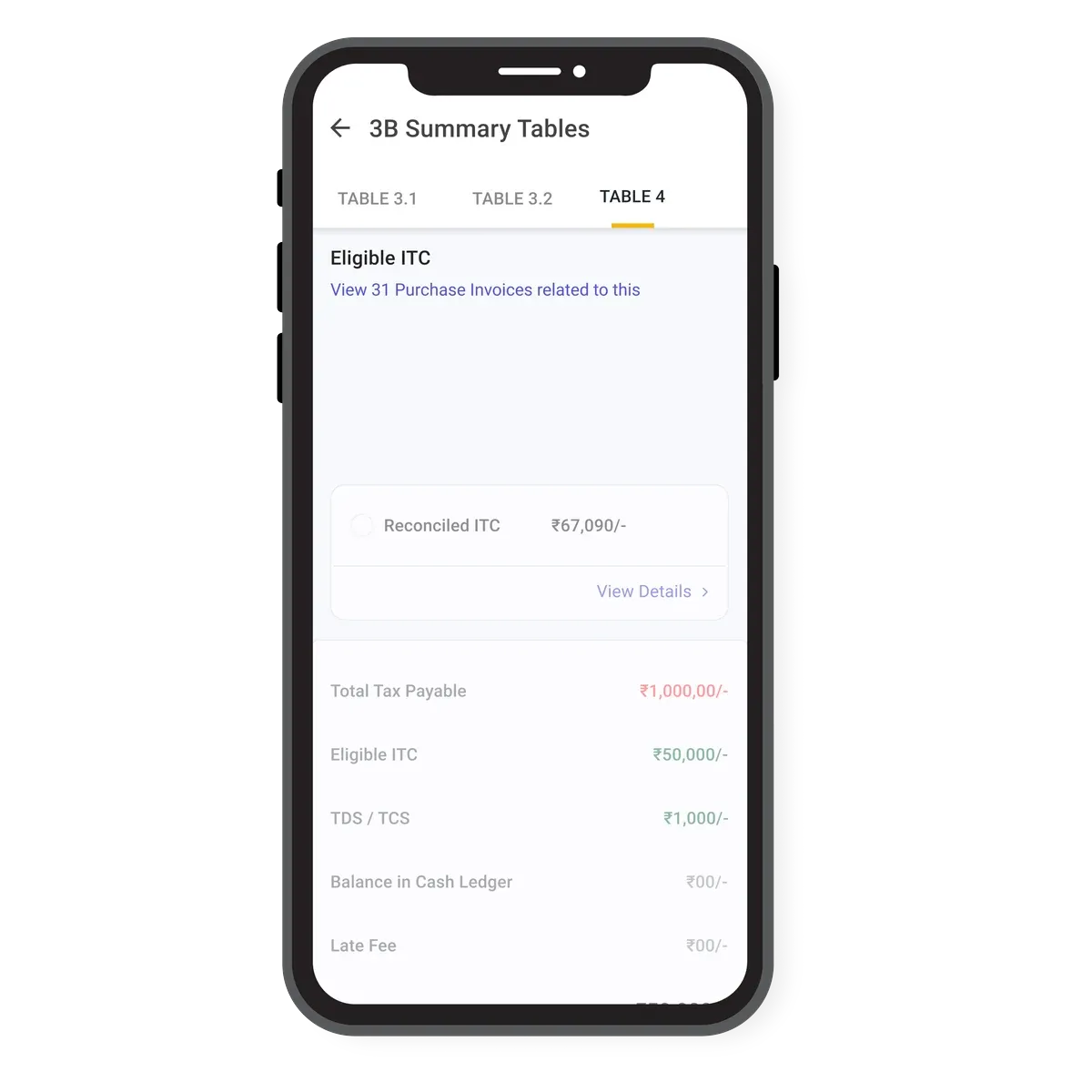
GimBooks syncs your invoices, purchases and notes, then fills Tables 3.1, 3.2 and 4 of GSTR-3B. Check the outward supplies, inter-state supplies and eligible input tax credit before you file.
- Outward and reverse-charge supplies
- Inter-state supplies
- Eligible input tax credit
Input tax credit
Match your purchases with GSTR-2A and 2B
Download GSTR-2A and GSTR-2B in GimBooks and match them against the purchases you recorded. Invoices your suppliers have not uploaded, and invoices that do not match, are flagged, so you can follow up before you claim the credit.
- Missing, mismatched and matched invoices
- Add a missing invoice to your books
- Remind the supplier or call them from the list
Pay and file
File GSTR-3B in three steps
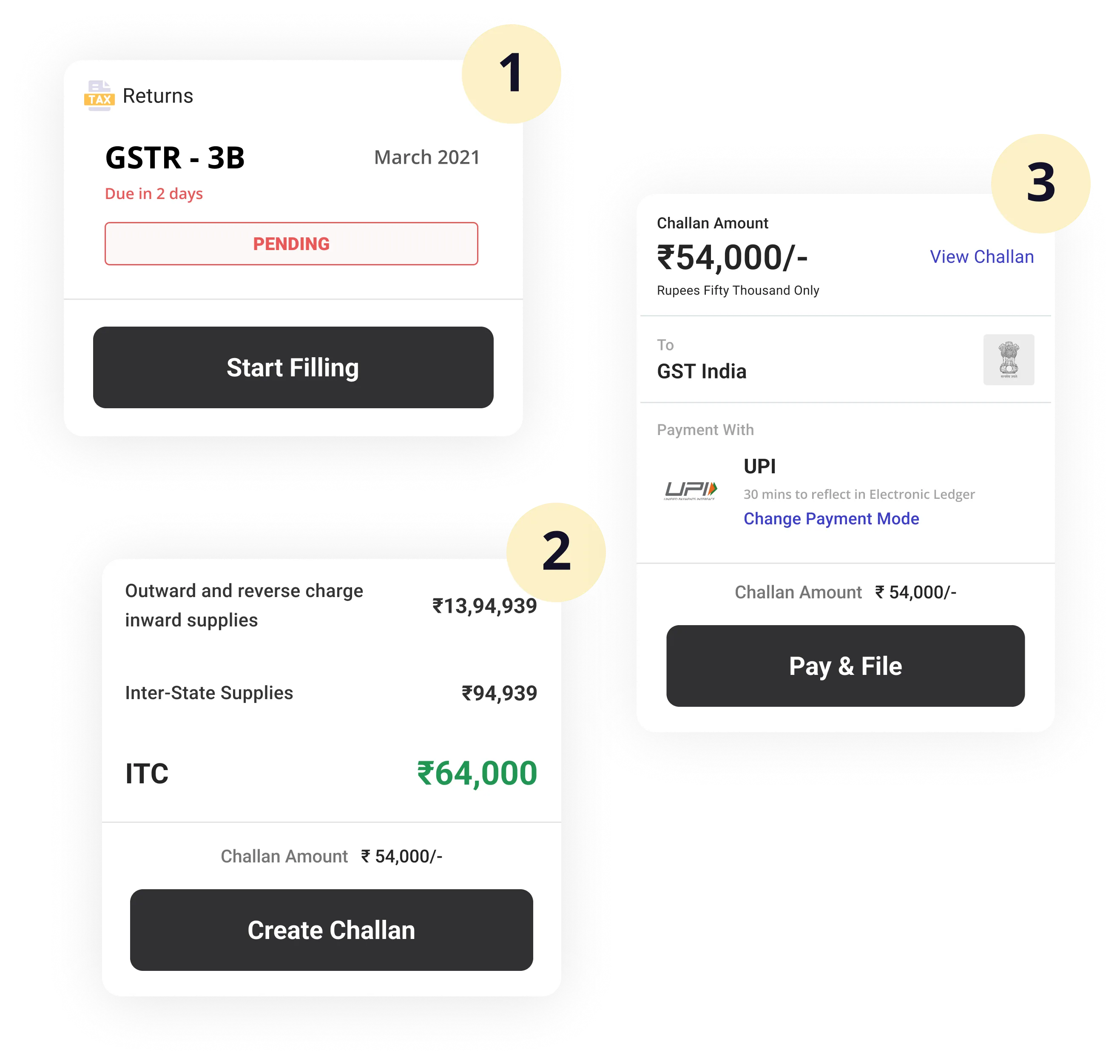
Start filing, create the challan for the tax due after input tax credit, then pay and file. GimBooks shows the challan amount before you pay, and the return is filed with an OTP on your registered mobile.
- Start filing
- Create the challan
- Pay and file with an EVC
Why GimBooks for GST returns
Your return comes from your billing
-
No retyping
Every invoice, purchase and note you make in GimBooks flows into GSTR-1 and GSTR-3B.
-
Reconcile before you claim
Match your purchases with GSTR-2A and 2B, so the credit you claim is backed by your suppliers’ filings.
-
Pay the challan in the app
Pay the tax due through the GST portal’s e-payment by UPI, NEFT or IMPS without leaving GimBooks.
-
File with an OTP
File the return with an EVC: an OTP sent to the mobile number registered on the GST portal.
-
Filing history
See which returns are filed and which are due, for every period, on one screen.
-
Help on call and WhatsApp
Stuck on a table or a mismatch? Our support team helps on call and WhatsApp.
How it works
How to file a GST return in GimBooks
- 01
Log in to the GST portal
Open GST in the app and log in with your GST portal username and the OTP. GimBooks syncs your data in a few minutes.
- 02
Check the return
Pick GSTR-1 or GSTR-3B for the period and check the tables. For GSTR-3B, check Tables 3.1, 3.2 and 4.
- 03
Create the challan and pay
Tap Create Challan, choose UPI, NEFT, IMPS or e-payment, and pay the tax due.
- 04
File
Swipe to file and enter the OTP sent to your registered mobile. The return shows as filed.
Tools and guides for GST
- Free tool
GST calculator
Add or remove GST at the current rates.
Open the tool - Free tool
HSN / SAC finder
Look up HSN codes and GST rates for your goods.
Open the tool - Guide
E-invoicing
Get the IRN for invoices that have to be e-invoiced.
Read more - Plans
Plans and pricing
Compare GimBooks plans. Every plan starts with a 7-day free trial.
See pricing
FAQ
GST return questions, answered
These answers follow the CGST Act and Rules as of 26 November 2026. Due dates are sometimes extended by notification, so check the GST portal or your tax adviser for your case.
What is GST return filing?
A GST return reports a business’s sales, purchases, the tax it collected, the input tax credit it claims and the tax it pays for a period. Registered businesses file returns on the GST portal, monthly or quarterly depending on their turnover and the scheme they are in.
Which GST returns can I file from GimBooks?
GSTR-1 and GSTR-3B.
Who has to file GST returns?
Every business registered under GST, even for a period with no sales, when it files a nil return. In most states, registration is compulsory once aggregate turnover crosses ₹40 lakh for businesses that only supply goods, or ₹20 lakh for services; lower limits apply in some north-eastern and hill states. Some businesses, such as those supplying goods to other states or paying tax under reverse charge, must register whatever their turnover.
What are the main types of GST returns?
GSTR-1 reports outward supplies (sales). GSTR-3B is the summary return in which tax is paid. Both are filed monthly, or quarterly under the QRMP scheme. Composition taxpayers pay tax each quarter with CMP-08 and file GSTR-4 once a year. GSTR-9 is the annual return, and GSTR-9C the reconciliation statement for larger businesses. Other returns cover special cases: GSTR-5 for non-resident taxpayers, GSTR-6 for input service distributors, GSTR-7 for TDS deductors, GSTR-8 for e-commerce operators and GSTR-10 when registration is cancelled.
What are the due dates for GSTR-1 and GSTR-3B?
Monthly filers: GSTR-1 by the 11th and GSTR-3B by the 20th of the following month. Quarterly filers under QRMP: GSTR-1 by the 13th of the month after the quarter, and GSTR-3B by the 22nd or 24th of that month depending on the state, with tax for the first two months of the quarter paid by the 25th of the following month. Composition taxpayers file CMP-08 by the 18th of the month after the quarter. GSTR-9 is due by 31 December after the financial year.
What is the late fee for GSTR-1 and GSTR-3B?
₹50 a day (₹25 CGST and ₹25 SGST), or ₹20 a day for a nil return. The late fee is capped at ₹500 for a nil return and, for other returns, at ₹2,000 if the previous year’s turnover was up to ₹1.5 crore, ₹5,000 up to ₹5 crore and ₹10,000 above that. Tax paid late also carries interest at 18% a year, and a return can no longer be filed once three years have passed from its due date.
How often do I have to file GST returns?
Regular taxpayers file GSTR-1 and GSTR-3B every month. Those with an aggregate turnover up to ₹5 crore can choose the QRMP scheme and file them every quarter, paying tax monthly. Composition taxpayers pay quarterly and file one return a year.
What are “details of outward supplies” in a GST return?
Your sales, reported in GSTR-1: invoice numbers, dates and values, the buyer’s GSTIN, HSN or SAC codes, the taxable value and tax, and the place of supply. Your buyers see these details in their GSTR-2A and 2B, which is how they claim input tax credit.
Can GimBooks help me claim input tax credit?
Yes. Download GSTR-2A and GSTR-2B in GimBooks and match them against your purchases. Invoices your suppliers have not uploaded are flagged, so you can ask them to file before you claim. Input tax credit can only be claimed for invoices that appear in your GSTR-2B.
How do I file a GST return in GimBooks?
Open GST in the app and log in with your GST portal username and the OTP. Let GimBooks sync your data, pick GSTR-1 or GSTR-3B, and check the tables (for GSTR-3B, Tables 3.1, 3.2 and 4). Tap Start Filing, then Create Challan, pay the tax due and swipe to file with the OTP sent to your registered mobile.
How can I pay GST from GimBooks?
Create the challan in GimBooks and pay through the GST portal’s e-payment by UPI, NEFT or IMPS.
Explore more GimBooks features
Every document is GST-ready and linked to the next, so nothing is typed twice.
- Invoicing GST and non-GST invoices with your logo, made in seconds and shared in a tap.
- E-invoicing Get the IRN and signed QR code for any invoice in one click.
- E-way bills Turn an invoice or challan into an e-way bill in one click.
- Inventory Stock updates itself with every sale and purchase.
- Quotations Send quotes, convert to invoices
- Proforma invoices Turn into a tax invoice in a tap
- Purchases Purchase bills, POs and vendors
- Delivery challans Original, duplicate and triplicate
- Credit notes Sales returns and corrections
- Debit notes Purchase returns and adjustments
- Payment receipts Record payments, share receipts
- Ledgers Party, cash and bank ledgers
- Expenses Track spend by category
File your next GST return with GimBooks
Billing, e-way bills and GST returns in one app. Every plan starts with a 7-day free trial.